
Notifications
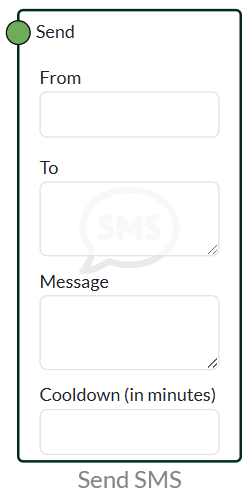
Send SMS
All our notification nodes are dynamic, so you can use “{}” to create a dynamic variable that changes according to the logic. You can use this in both the “to” field and the “message” field
GSMCLOUD allows you to send SMS to an infinite number of recipients.
You can connect any boolean node with the send input on the node, when the parent node becomes TRUE the "Send SMS" node will send an SMS to the entered phone numbers.
Setting up the node:
From: To be filled in with sender information. You can enter up to 11 ASCII characters (not Æ, Ø and Å).
Example: Water alarm
To: To be filled in with the recipient's phone number. Do NOT enter a country code in front of either 0045 or +45, as the system already has a static country code in the programming. Multiple phone numbers can be entered by using a line break (Enter) after each recipient.
Message: The Message field can be filled in with the information to be sent in the SMS. The SMS message can contain a maximum of 160 characters, and you can enter Æ, Ø and Å. You can use a variable, e.g. {Temperature}, here you will be able to connect your strings from e.g. temperature input and this data will be included in the SMS message. Variables are not defined in the system, so when you create a {text} it will automatically create the input you want, however, we do not recommend using Æ,Ø,Å.
Cooldown (in minutes): Cooldown can be used to give your node a break. For example, if a pulsed signal is sent to the system and you don't want to be notified constantly, but only want a new message every 30 minutes. If you don't want a cooldown, you can simply leave the field blank or fill it with 0.
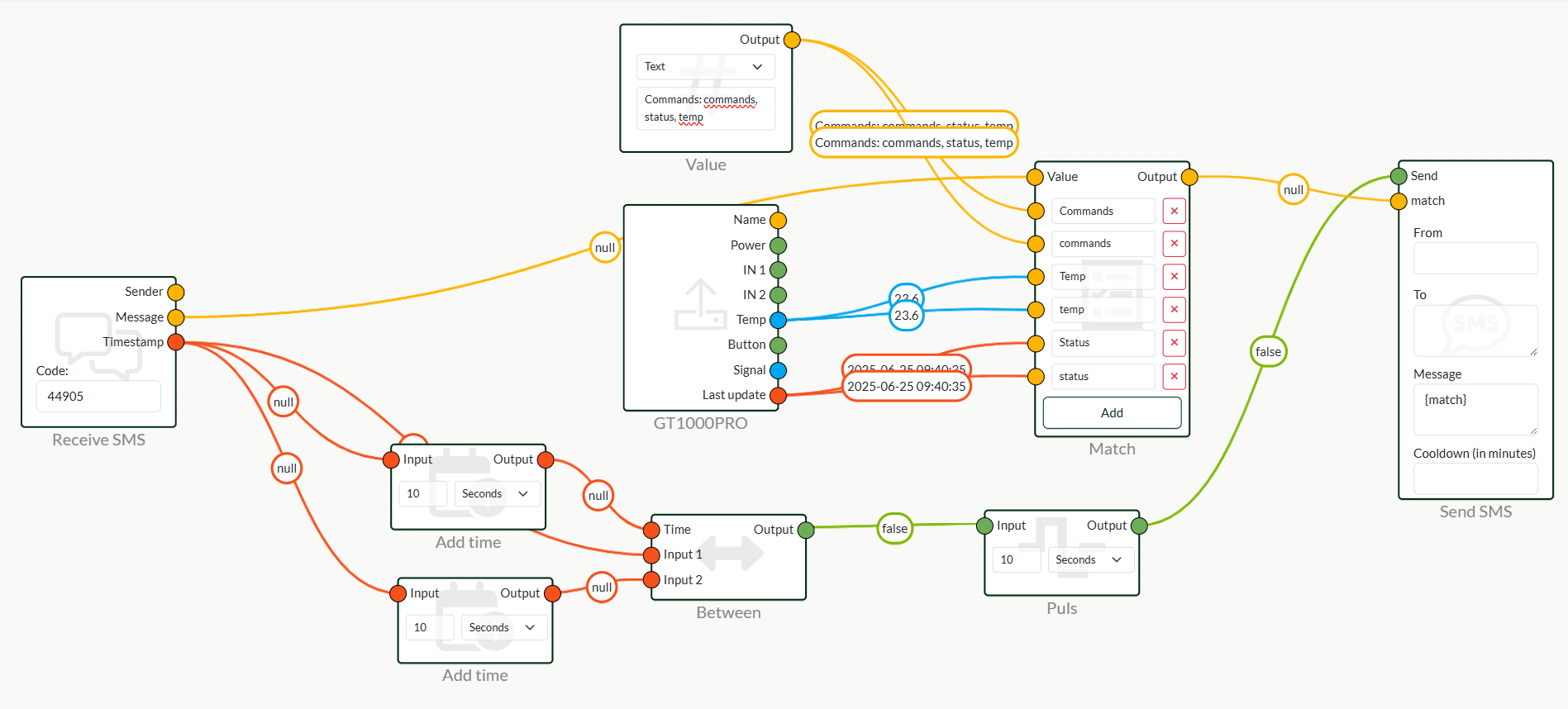
Receive SMS
GSMCLOUD allows you to send SMS messages to our system.
This allows you to process incoming SMS messages and trigger things in the flow depending on incoming SMS messages.
Setting up the node:
Transmitter: Sends recipient phone number information - Incoming phone numbers are displayed in the format +4512346578
Message: Turns incoming SMS message into a string that can be processed in the system.
Timestamp: Provides a timestamp of when the SMS was received.
Code: A code must be defined in the incoming SMS message that the system looks for. To make sure it is processed in the correct flow, the start of the SMS message must contain the code from the node. The code is dynamically defined and cannot be changed. If you want a private code or your own phone number, please contact GSMCLOUD.
Phone number: You must send the SMS message to GSMCLOUD's phone number for us to process it. The phone number we take incoming SMS messages on is: 52 51 25 00
Here is a very simple example - you can make use of Match Nodes With premium.

Send Mail
GSMCLOUD allows you to send emails to an infinite number of recipients.
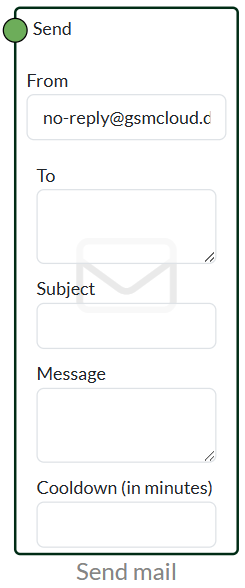
You can connect any boolean node with send input on the node, when the parent node becomes TRUE the "Send SMS" node will send an email to the entered recipients.
Setting up the node:
From: From is the sender field, it is not dynamic and therefore all emails are sent out of the system from our no-reply mail.
Two: Filled in with the recipient's email address. Multiple email addresses can be entered by using line breaks (Enter) after each recipient.
Subject: Filled in as a subject field and will be placed in the mail header of the incoming email.
Message: The Message field can be filled with the information to be sent in the email. You can use a variable such as {Temperature}, here you will be able to connect your strings from e.g. temperature input, and this data will be included in the email. Variables are not defined in the system, so when you create a {text} it will automatically create the input you want, however, we do not recommend using Æ,Ø,Å.
Cooldown (in minutes): Cooldown can be used to give your node a break. For example, if a pulsed signal is sent to the system and you don't want to be notified constantly, but only want a new message every 30 minutes. If you don't want a cooldown, you can simply leave the field blank or fill it with 0.
Make Call
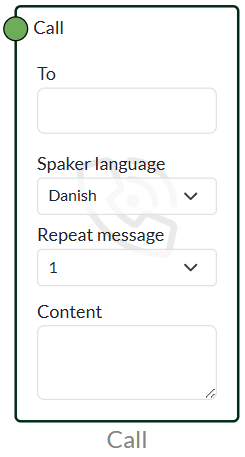
Uniquely, GSMCLOUD can make calls out of the system to an unlimited number of phones.
Our system has an AI robot that can speak and give a precise command. This can be very convenient if you want to use GSMCLOUD as a kind of virtual control centre.
Setting up the node: .
Two: Filled in with the recipient's phone number. Do NOT prefix the country code with either 0045 or +45, as the system already has a static country code in the programming.
Speaker Language: Here you can choose between Danish and English.
Repeat Message: Repeats the message from "Content" - The system does not wait until you have the phone ready, as you would normally do when talking to a human, so it can be beneficial to repeat the message a few times. It can be repeated up to 4 times.
Content: The Contet field can be filled with the information to be said in the call. You can use a variable such as {Temperature}, here you will be able to connect your strings from e.g. temperature input, and this data will be said in the call, so you have the latest information. Variables are not defined in the system, so when you create a {text} it will automatically create the input you want, however, we do not recommend using Æ,Ø,Å.
Webhook
Our system can send data out to your endpoint via our webook. For example, if you need to integrate your data with other software, this can be sent. We also have an API available, which you can find in our API documentation.
With webhook, it sends new data out when you have new data in the node, so you can get a new call every time the data changes, which is an advantage over the API that only sends data when it is requested.
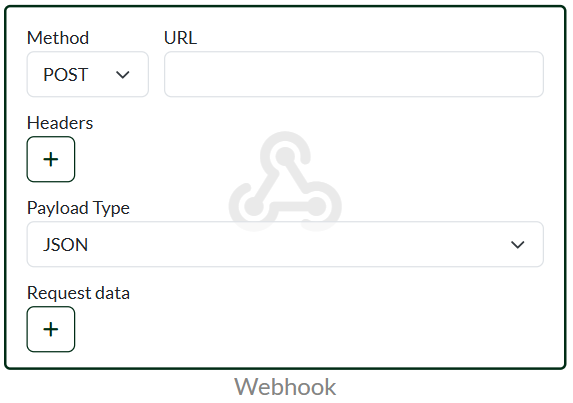
Setting up the node: .
Method: Here you can choose between POST, GET, PUT, PATCH and DELETE
URL: Enter the URL or IP of the server where the data should be sent to.
Headers: Allows you to enter the header name and value. For example, it may be necessary in some contexts to include your token in the header.
Payload types: The system supports the following payloads JSON, Form, XML and RAW.
Request Data: Here you enter the variables that you want to receive data about. You can use __ (double underscore) if you want to do nesting
JSON Example
Without nesting
					{
    "Temperature":13,
    "Status":1
}
Med Nesting
					(__1):
{
    "Temperature": {
        "1":13
    },
    "Status":1
}
 Dansk
Dansk  English