

Flow example for: Wireless temp & humidity sensor BLE
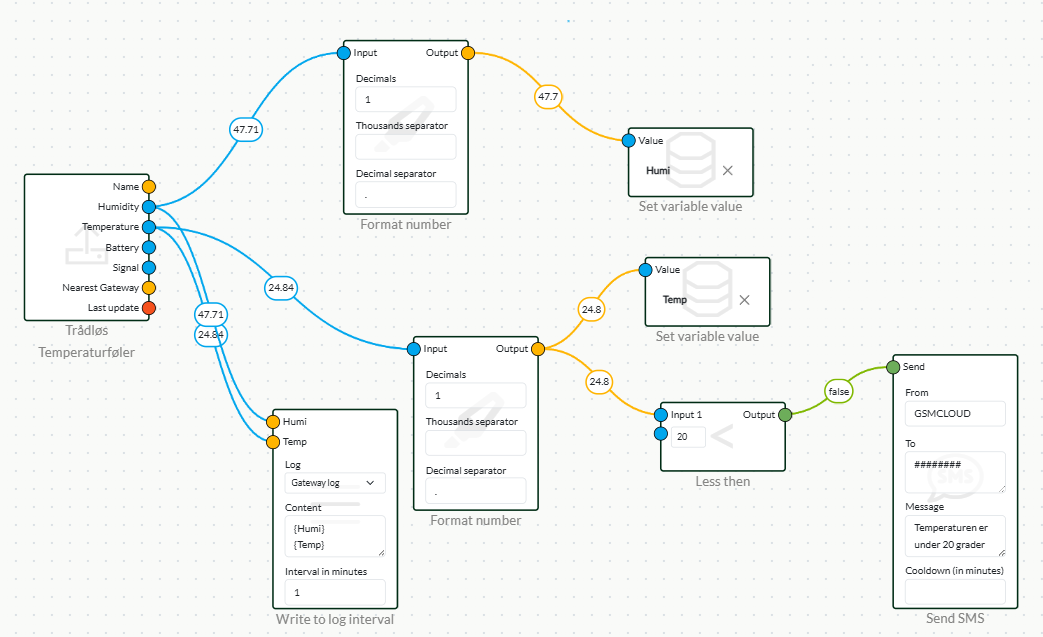
Dashboard
- Start by pulling your beacon into the flow.
- Drag to format number from the Number menu
- Drag to Set variable value from the Dashboard menu
- Connect from Gateway to Format number to Set variable
- Fill in a 1 in each decimal in Format number and a period in Decimals seprator.
- Select your variable dashboard or create a new one.
Logging
- Drag a Write to log interval from the Logging menu.
- Select your log or create one under the logs tab.
- Fill in your content in the content field e.g. {temp}
- Connect from Temperature on beacon to Temp on Write to log interval.
SMS ttemperature alarm
- Drag a Less then from the Number menu.
- Drag a Send SMS from the Notifications menu.
- Connect from the output of Format number coming from Temperature on the beacon to Less then
- Fill in at which setpoint it should alarm at if it falls below the desired setpoint, e.g. 20.
- Connect to Send SMS from Less then output to Send on Send SMS.
Please note! This flow is just an example, your flow can be built according to your needs, this flow is just for inspiration.
 Dansk
Dansk  English