

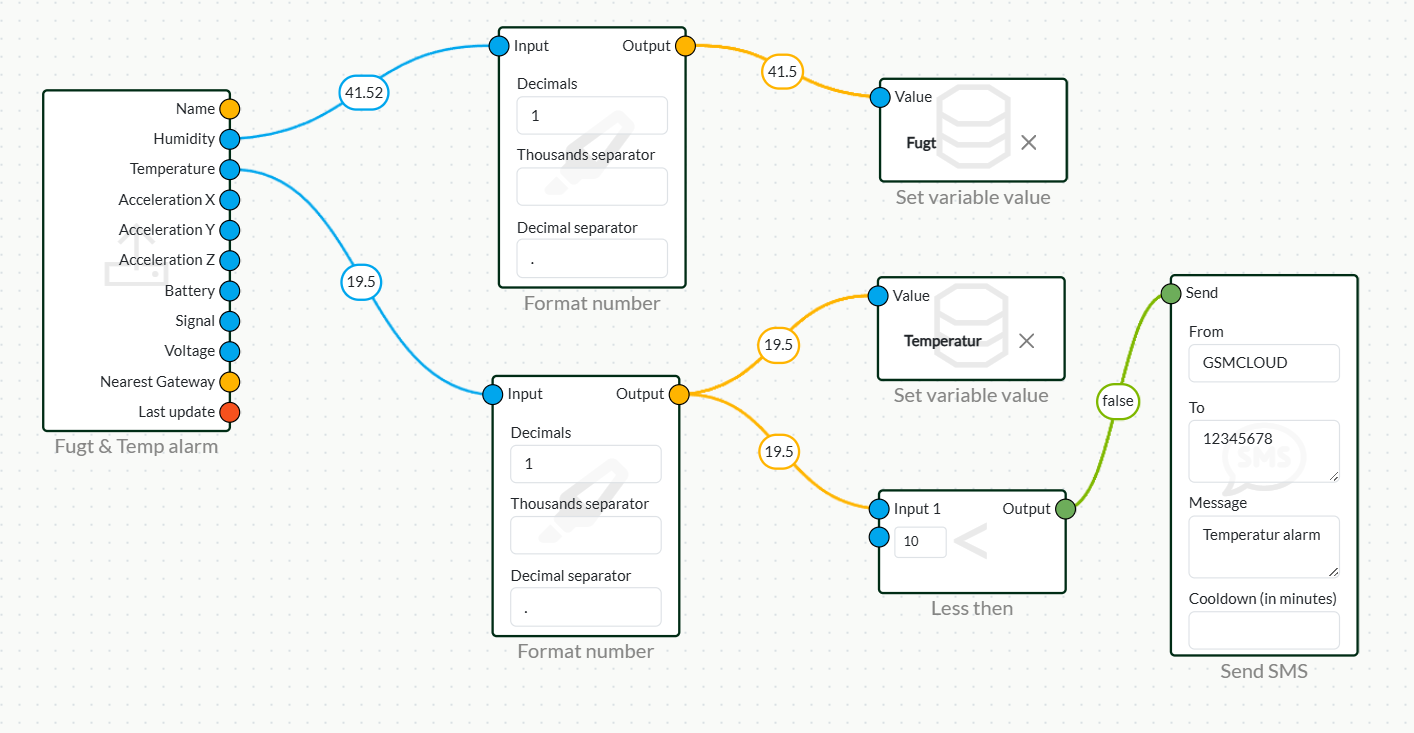
Flow setup
- Start by pulling your beacon into the flow.
- Drag a Send SMS or Make call from the Notification menu, two Format number from the Number menu, two Set variable value from the Dashboard menu.
- Connect from beacon: Temperature and Humidity to their respective Format number
- Put a 1 in decimal and a dot in decimal separator in each Format number
- Then drag from Output on Format number to both Set variable value or a less then from number so you can set a point where it should send a message if it falls below. For example, 10 degrees.
- Fill in your details and what to say in the text message or what to say in the call.
Temperature readout
- Create a Value with, for example, the name Temperature.
- Go to Dashboard in the top menu of the website.
- Create a dashboard or go into one you've already created.
- Tap Edit in the top right corner.
- Select a Bar chart or Value in the Widget menu.
- Tap the small cog on the new widget and select Temperature.
- Finish by pressing save.
Mobile viewing
- Tap share on the right side.
- Switch Allow public access on.
- With that url page, you can access your dashboard on your phone as an app.
Please note! This flow is just an example, your flow can be built according to your needs, this flow is just for inspiration.
 Dansk
Dansk  English