

Some people want to be able to control various different things through both a dashboard and their phone with, for example, SMS. This can be done with GSMCloud and can be scaled in terms of numbers and commands.
In this post we will make use of the following nodes:
- TIME: Add Time, Between, Pulse.
- LOGIC: NOT Gate, Is NULL, Value, AND, Match.
- Notifications: Receive SMS, Send SMS, Write To Log.
Compared to a basic flow that uses commands through SMS, it's relatively simple.
We start by making use of our "Receive SMS" node where we need to create a sub-system that keeps track of when the flow should be updated. This is because we can easily encounter something called "deadlock".
And REMEMBER, don't leave anything unused in the "TO" field in Send SMS.
Update System
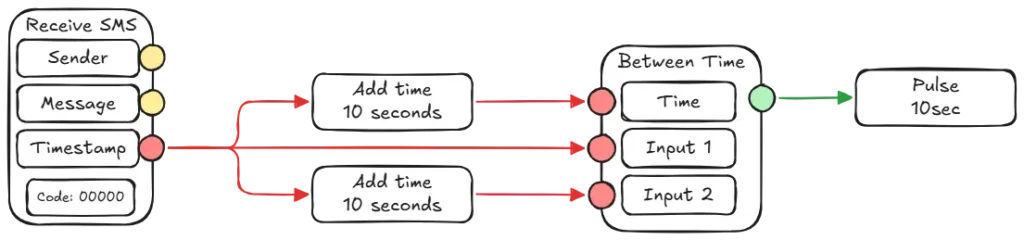
We start by taking our Receive SMS, after which we need to connect Timestamp to 2x Add Time - Add Time should be set to 10 seconds. Now we need our Between node, this node should be connected to both Add time nodes - one should time "Time" and the other to "Input 2". Now just connect the Timestamp from Receive SMS to "Input 1". Between node's output goes in a 10 second pulse.
Phone Numbers
This part isn't complicated, but can be long considering how many people need to be able to send SMS messages to the system. Here we need our Value(text) node and Match node.
How does the match node work?
In short, it takes an input that it matches with the fields in it and takes the input that goes to the field.
First and foremost, it's a good idea to have a list of the people who will be on the system. All numbers should start with a country code. So in our case "+45".
In Receive SMS there is an output called "Sender" which should be dragged to our match node's input. Now the node will match the phone number that comes in with the one written in.
Now you can take the Value node and change it to text to add names to the match node, so you can easily log who sent an SMS and when without any problems.
Now you have a system that will handle phone numbers and make sure they are the right ones.

SMS Commands and codes
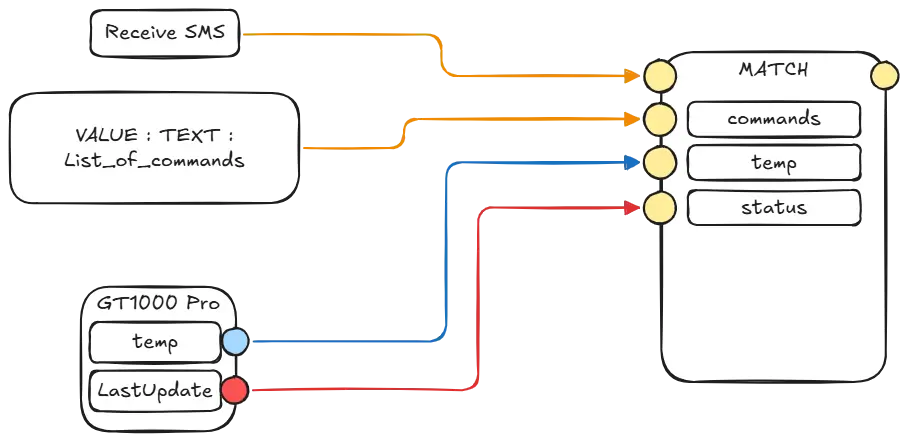
It's really just the same as with phone numbers. There's not much difference, the only difference is that it doesn't really matter what you type in the Match node. As long as it gets the right kind of input. For example, if you give it a value "TRUE", it will pass "TRUE", but "TRUE" will not be logged or sent as a message without an additional system that can "transform" the value to a STRING that is "alive". BUT, it can be used in the form of a system to "trigger" something else if it wants to.
But you can give the match node "temp", "1" or "?62345". After you have created the commands you want, you can take any output from your device, for example temperature and last update from a GT-1000 Pro, you will not be able to take battery because it is a true/false value, without having to do anything extra.
However, I don't want to log people who are not on the list.
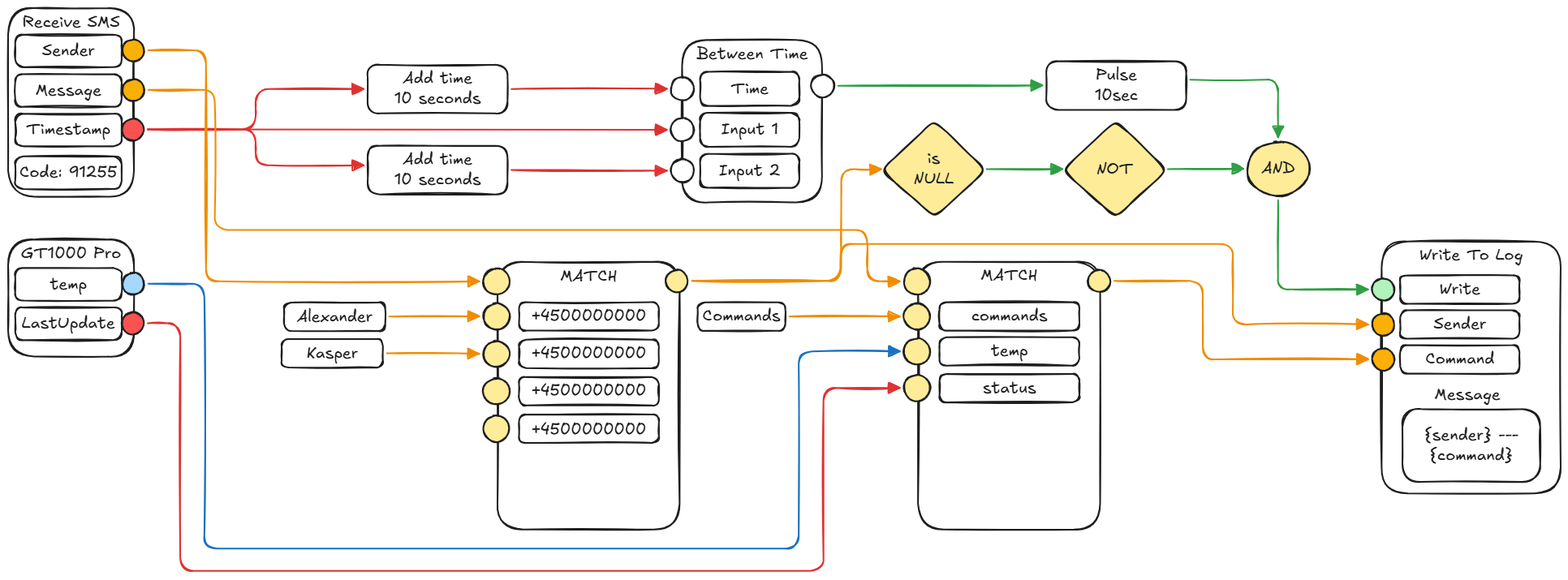
No problem, we just add a little extra to the flow. If the Match node for data that doesn't match, it will give "NULL" as an output. Which means we can cube an "Is NULL", "Not GATE" and an "AND Gate" node to fix the problem.
Take an "Is NULL" node and connect it to our output of our phone number match node. Then we need to connect our "Is NULL" to an "AND Gate". Then connect your Pulse to the "AND Gate" as well.
This means that it will always send true if a new message arrives regardless of whether it is the same number or not. It also means that if a person sending an SMS is not on the list of "allowed" phone numbers, our "AND Gate" will not go to "True".
Connect the whole system together
First of all, we can add a "Write To Log" node. With this we need to create a message, in this message we need to create some variables - to keep it simple my message will just be `{sender} - {command}`. This allows us to pull other nodes' output into our message.
Now it's finally time, in your Receive SMS you need to connect "Sender" with your phone number match node - furthermore you need to connect "Message" to the command node.
Both your phone number match node and command node should be connected to our "Write To Log" node. And our "AND Gate" should be connected to our "Write" Input on the Log node.
But I would like to receive an SMS message
Then you just use our "Send SMS" node. You need to add all the phone numbers you want to send to in the field called "To", to enter more numbers, press "enter" after, numbers in this node do not need a country code.
It should be said that everyone in this node will get a message - separating messages based on who is sending a message requires further development in your flow.
 Dansk
Dansk  English