

There are several different ways to reset things in our Flow system. It depends mainly on which product you have and which project you have running. There is a big difference between resetting a people counter and resetting a water sensor or other types of alarm systems.
People who use people counters will typically have them reset according to hours of the day, days, weeks, months and years. Here, of course, a number is logged so you can run statistics on it. For a water sensor, it's not quite the same, as you typically want to check in relation to frequency, for example per week, month or season. This means that there can be a difference in both the interval and the logic behind it.
Based on Time
Setting up time intervals for resets is relatively quick and easy as long as you keep it simple and specific. Typically, you would take a "current" node and extract hours or minutes so that they can be used to reset.
There are also some more niche methods, for example if you need to reset every two hours or some other rarely used interval. In those cases, it may require a bit more maths so that things can be calculated dynamically.
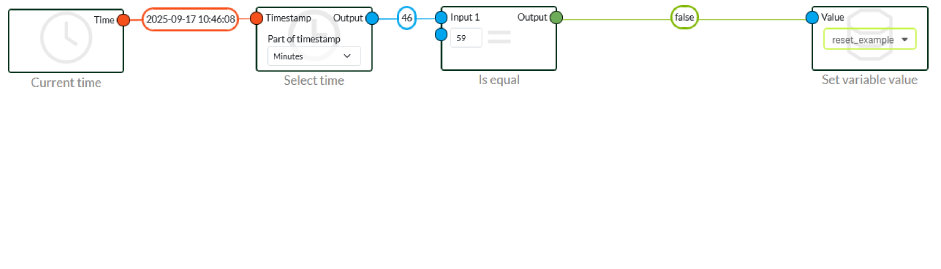
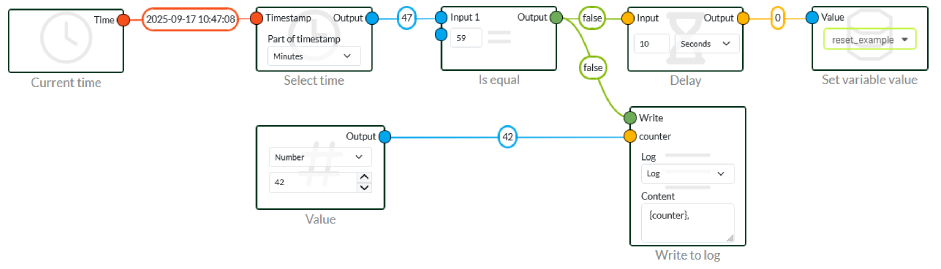
A simple example of a normal flow is a reset every hour. This is done by checking if the minutes are equal to 59. Every time we hit 59, a reset is performed. This is the most basic way to do it. If you want to log on, you can, for example, insert a Delay node between the logic and the variable. This way you can add a log node to "Is Equal" so that it first logs and then sends the signal on after 10 seconds.
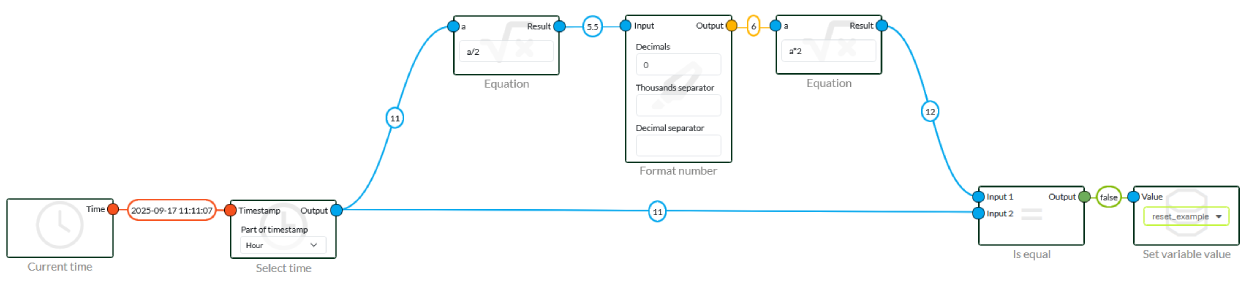
You could make 12 "Is Equal" nodes with the values 0, 2, 4, 6, 8 etc. You can, but it takes time and resources. Instead, you can use an equation node and a little maths. Normally you would use modulus in algebra. It refers to the residue function in modular arithmetic, for example 4 % 2 = 0.
In our case, it looks mathematically like this, as we don't have "%" available:
					If the hour is equal to floor(hour / 2) × 2, it is even. Otherwise, it is odd.
isEven=(hour=floor(hour/2)×2)
Reset based on day(s)
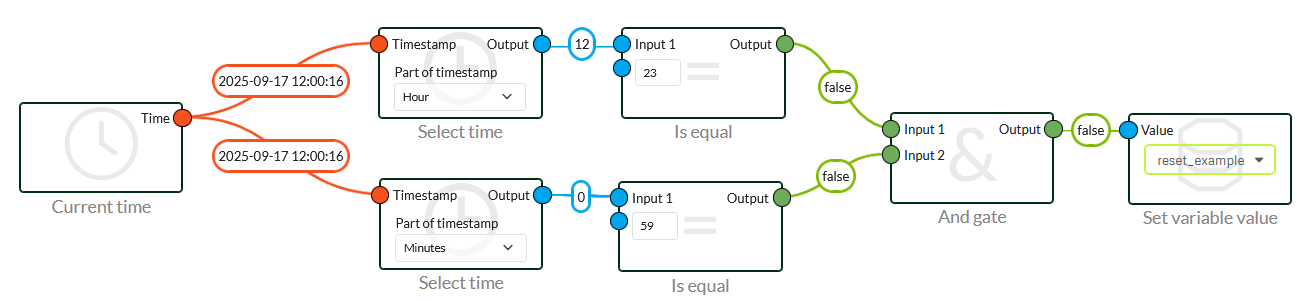
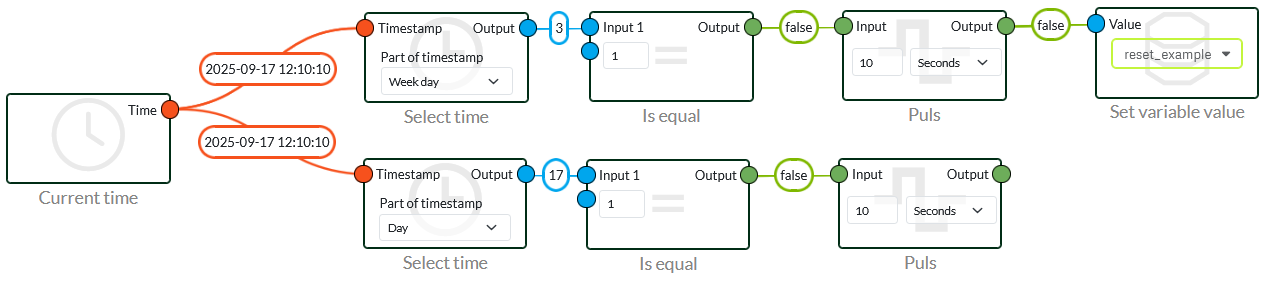
If you want to reset daily or on a specific day of the week, it's pretty simple. The same applies if it's a specific day of the month. It's generally the same principle throughout.
In the first image, you can see how to reset daily as well as on a specific day of the month or on a specific day of the week. However, be aware that months have different numbers of days, which can cause problems. Therefore, stay within days 1-28 or use days of the week.
Monthly Reset
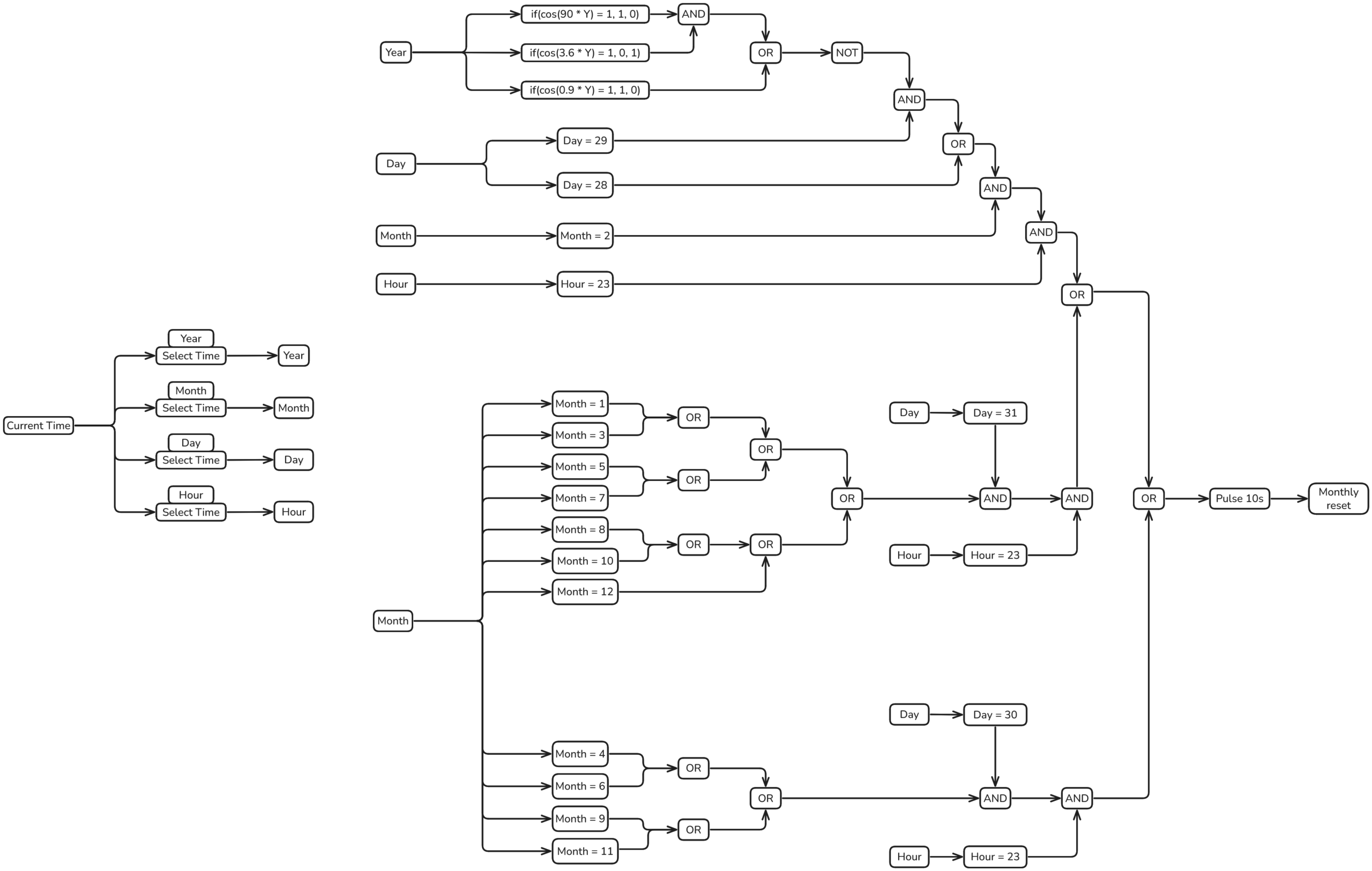
When it comes to resetting monthly, it's really important that it's done on the last day of the month and not the first day. This is because of how our graphs behave in our system, if you reset on the first day, the numbers from last month accumulate. Which will end up giving a completely wrong number. Since there is no node or function to get the last day of the month, it takes a bit of maths and logic.
					DIV4: if(cos(90 * Y) = 1, 1, 0)
NOT100: if(cos(3.6 * Y) = 1, 0, 1)
DIV400: if(cos(0.9 * Y) = 1, 1, 0)
These forms are required due to leap years and are only used to calculate February.
DIV4 - Gives a 1 if the year can be divided by 4. Which will take most cloud years.
NOT100 - Returns a 0 if the year can be divided by 100, otherwise it returns 1. This removes years like 1900 and 2100 etc.
DIV400 - Gives a 1 if the year can be divided by 400, meaning it can handle years like 2000, 2400 etc.
You can run a simple check by using the following years:
2024 → Div4=1, Not100=1, Div400=0 → Leap=1
1900 → Div4=1, Not100=0, Div400=0 → Leap=0
2000 → Div4=1, Not100=0, Div400=1 → Leap=1
2025 → Div4=0, Not100=1, Div400=0 → Leap=0
In relation to the other months, we can categorise them according to the number of days in the year, which is either 30 or 31.
28-29 days:
February
30 days:
April, June, September, November.
31 days:
January, March, May, July, August, October, December.
Annual reset
An annual reset, on the other hand, is easy. Here we simply reset on the first day of January.
If you want to reset on the last day of the month, it requires some extra logic to handle the different month lengths. This is generally not something we recommend.

 Dansk
Dansk  English